

For convenience, liquor, beer and wine, and grocery store owners
Your costs keep going up. Are your prices keeping up?
Stocklen reads your register and your invoices. It shows what is selling, what you make on each item, and what to order next. On your phone.
Works with Clover. Square, Lightspeed and more coming soon. No card needed to sign up.
Grow what works
See what sold more, what sold less and what did not sell, then back your winners.
Price it right
Your margin on each item, from the price you paid.
Order smarter
A suggested order for each vendor, from what is running low and how your store sells.
Grow what works
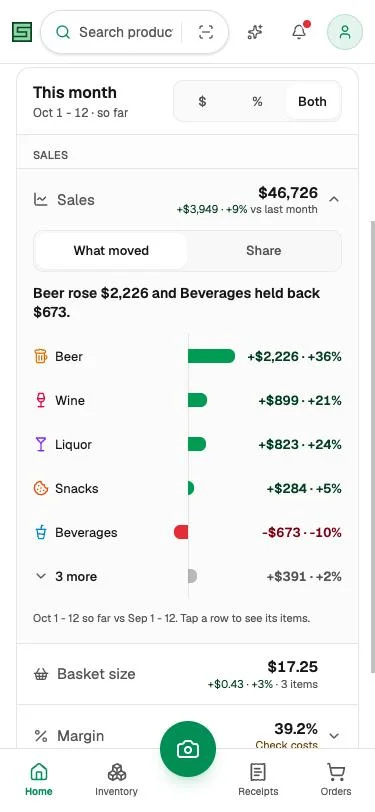
Know what your customers buy
Which items are growing, and which are slipping?
See what is selling more than last time, what is slowing down, and what has not sold at all.
- Back your winners
- Spot what stopped selling
Price it right
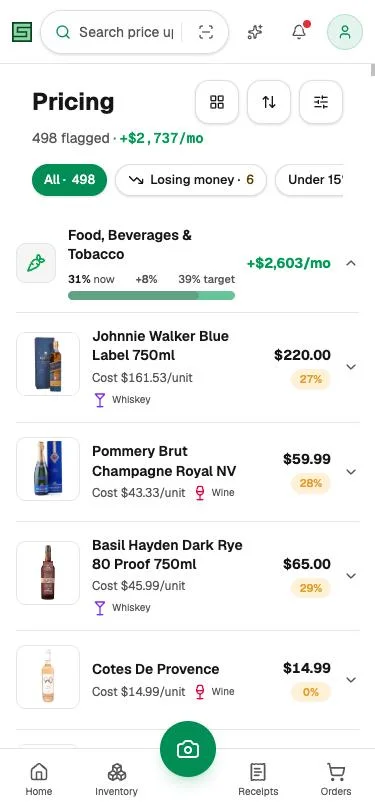
Protect your margin
Which items are you losing money on?
Stocklen uses what you actually paid to show your real margin, item by item.
- See the prices that fell behind
- Get the price that fixes each one
- Tap to update your register
Order smarter
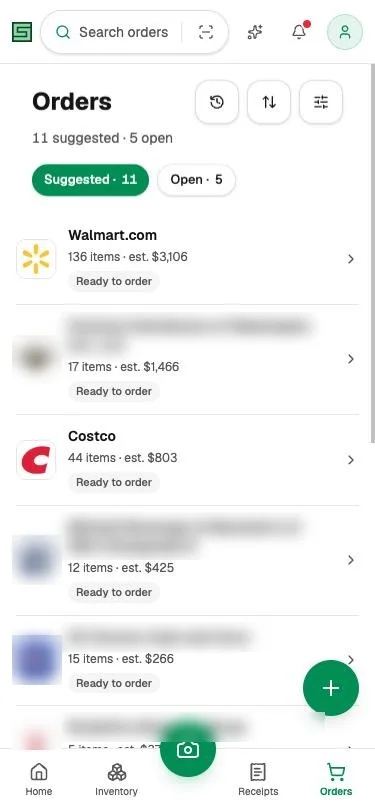
Buy the right amount
Still ordering from memory?
Stocklen knows what is running low and how your store sells, and builds a suggested order for each vendor.
- One suggested order per vendor
- Adjust it, approve it, send it
- No need to count every shelf
Up and running in three steps.
You keep buying and selling the way you do today. Stocklen brings the numbers together.
- 1
Connect your register
Sign in with email or Google and connect your register. Works with Clover today. Square, Lightspeed and more coming soon.
- 2
Bring in your purchases
We read the purchases you already make. We set it up with you.
- Costco, Walmart, Provi
- From your vendor accounts
- Your distributors
- Forward the invoice email
- Paper receipts
- Snap a photo
- 3
Check in each week
Look at what is growing, the prices to fix, and your next order. All from your phone.
Nothing changes in your store until you tap.
Stocklen never checks out or pays for you. Your data stays yours.
Questions owners ask
Which registers work?
Clover today. Square, Lightspeed and more are coming. Tell us what you use and we will let you know.
Does it replace my register?
No. You keep ringing up sales the same way.
My vendor is not on the list.
Send its invoices by photo or email. Stocklen reads them.
Do I need a computer?
You use Stocklen on your phone. Costco, Walmart and Provi orders come in through Chrome on a computer, and we set that up with you.
Is the stock count exact?
It is a running count, and Stocklen tells you which few items to double-check.
What if I stop?
Email us and we will send you your data or delete it.
See your store's real numbers this week.
No card needed to sign up.